언리얼4 - 리퀴드 이로이젼(침식) 효과


언리얼4 - 리퀴드 이로이젼(침식) 효과

금별 0 5,135 2020.03.12 18:36


Liquid Erosion


I'm using Blenders "Dynamic Paint Canvas" to capture a liquid getting splashed on a surface over time resulting in an image sequence of "wet maps". To combine them into one image (adding then on top of eachother) I wrote a Python Script which generates an "erosion map". With a simple SmoothStep-Material, this map can be used to fade the liquid in/out nicely.

My python script: https://www.dropbox.com/s/x35wuxxtl7epesk/createErosionTexture.py?dl=0

Base-Idea described in this Sea of Thieves Talk: https://youtu.be/KxnFr5ugAHs?t=658

I was inspired by a FLIP Fluid Tutorial: https://youtu.be/GYGNoTmZSN0

How to setup an erosion material: https://realtimevfx.com/t/what-is-your-alpha-opacity-mask-clip-erode-animation-workflow-like/7705/15?u=simonschreibt

Quickly render Normal Map from Blender: https://youtu.be/h24akA8K-40
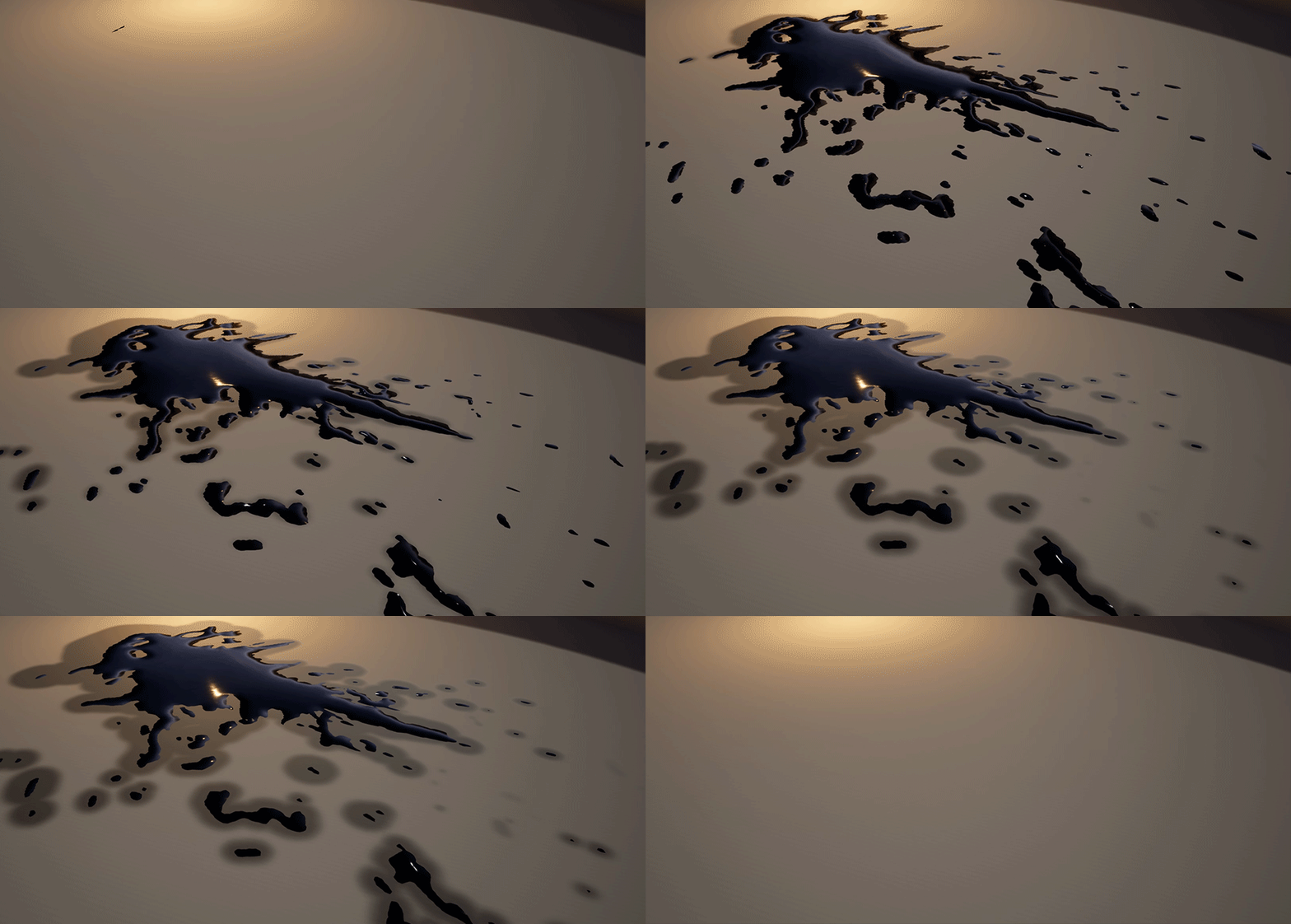


A liquid which appears over time based on an erosion map. The wetness on the ground is a 2nd erosion map with Blenders Canvas-"Spread" enabled.
The base-technique was discussed in this great Sea of Thieves Talk: https://youtu.be/KxnFr5ugAHs?t=658
A liquid which appears over time based on an erosion map. The wetness on the ground is a 2nd erosion map with Blenders Canvas-"Spread" enabled.

The base-technique was discussed in this great Sea of Thieves Talk: https://youtu.be/KxnFr5ugAHs?t=658


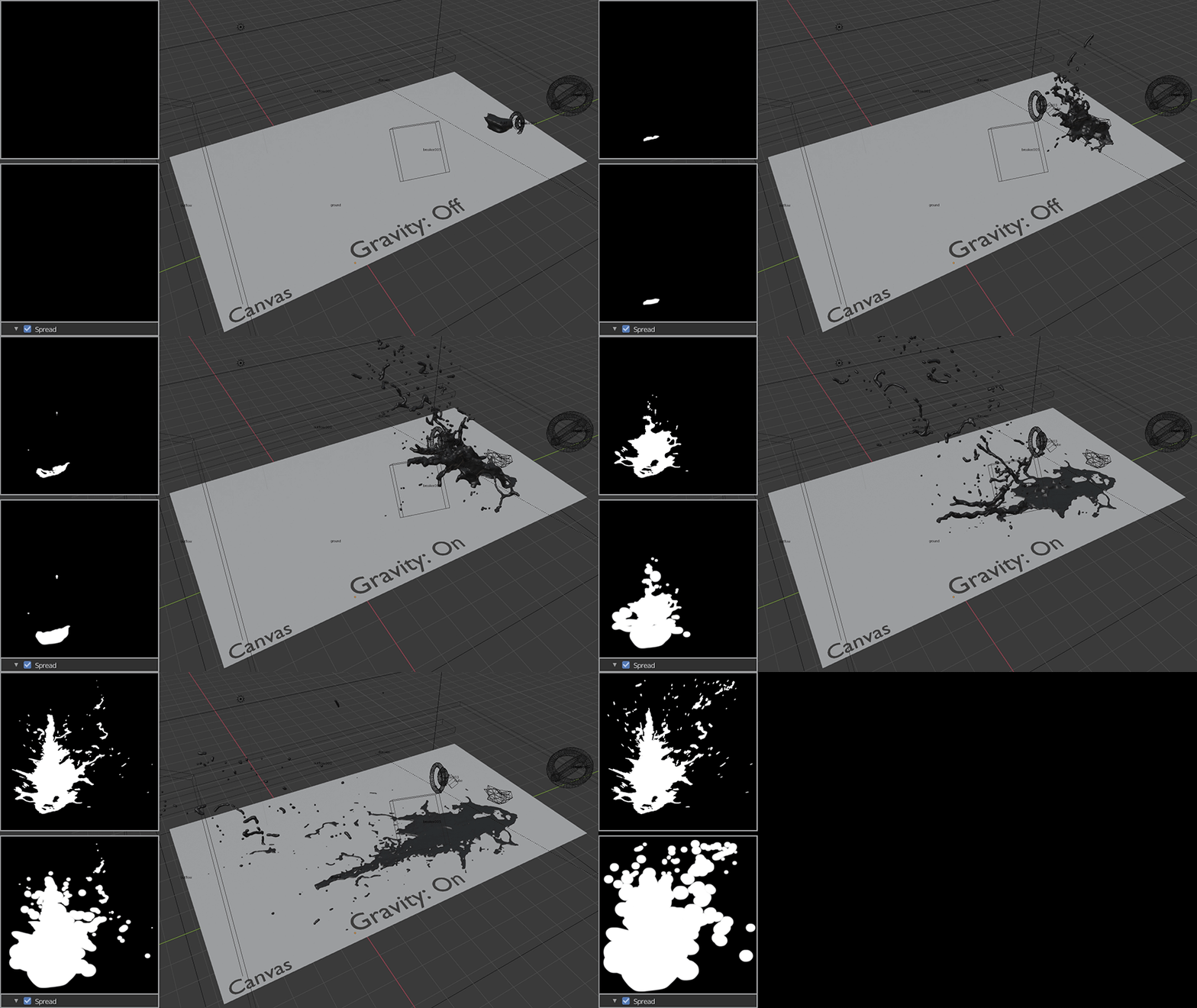
I used a Blender FLIP Plugin for the liquid and Blenders "Dynamic Paint Canvas" which "tracks" everything it touches - in this case the liquid. The result is an image-sequence. I baked a 2nd image-sequence where the wetness is spreading.
I used a Blender FLIP Plugin for the liquid and Blenders "Dynamic Paint Canvas" which "tracks" everything it touches - in this case the liquid. The result is an image-sequence. I baked a 2nd image-sequence where the wetness is spreading.


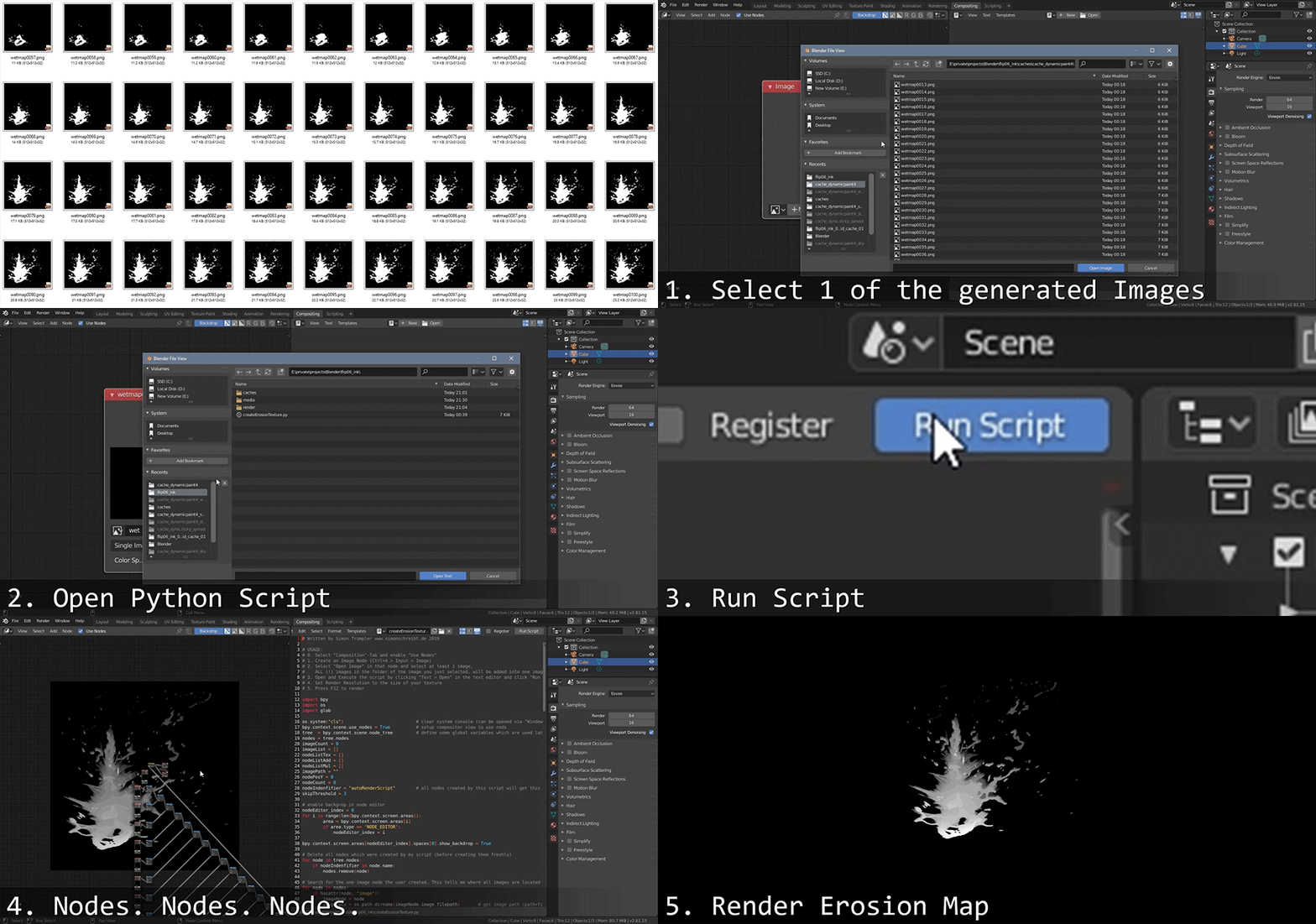
I wrote a Python-Script which grabs all the images and stacks them on top of eachother into ONE image which is now my erosion map. With a simple shader those grayscale values can be faded on/out nicely.
I wrote a Python-Script which grabs all the images and stacks them on top of eachother into ONE image which is now my erosion map. With a simple shader those grayscale values can be faded on/out nicely.


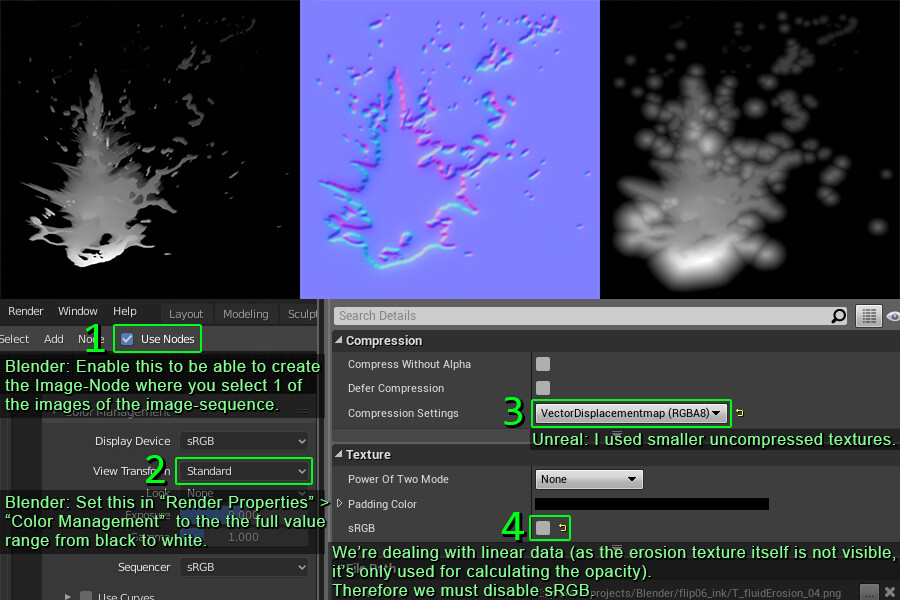
Here you can see the textures and some "gotchas". The normal map was created via Photoshop-Filter from the last rendered Blender-Frame.
Here you can see the textures and some "gotchas". The normal map was created via Photoshop-Filter from the last rendered Blender-Frame.


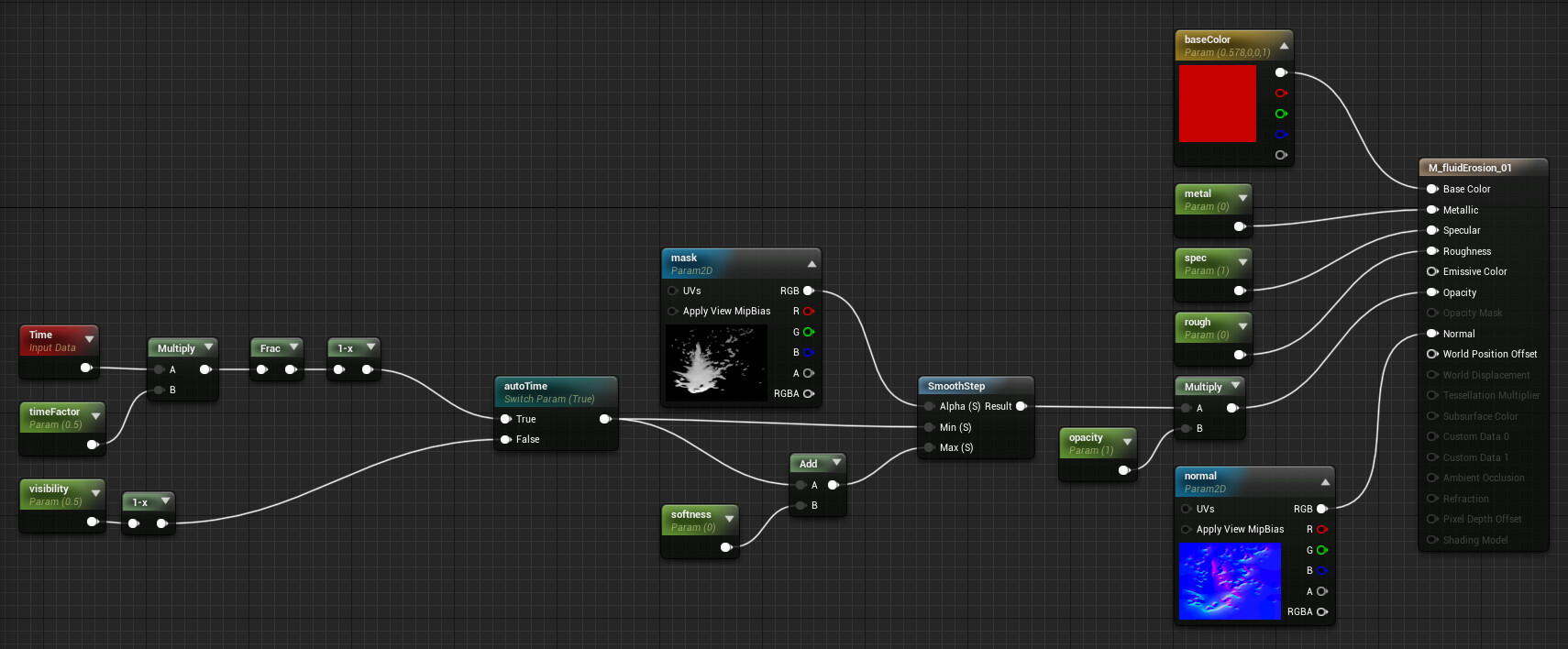
The pretty simple material. Of course, values like "base color" are different in my Material Instance for the final look.
The pretty simple material. Of course, values like "base color" are different in my Material Instance for the final look.


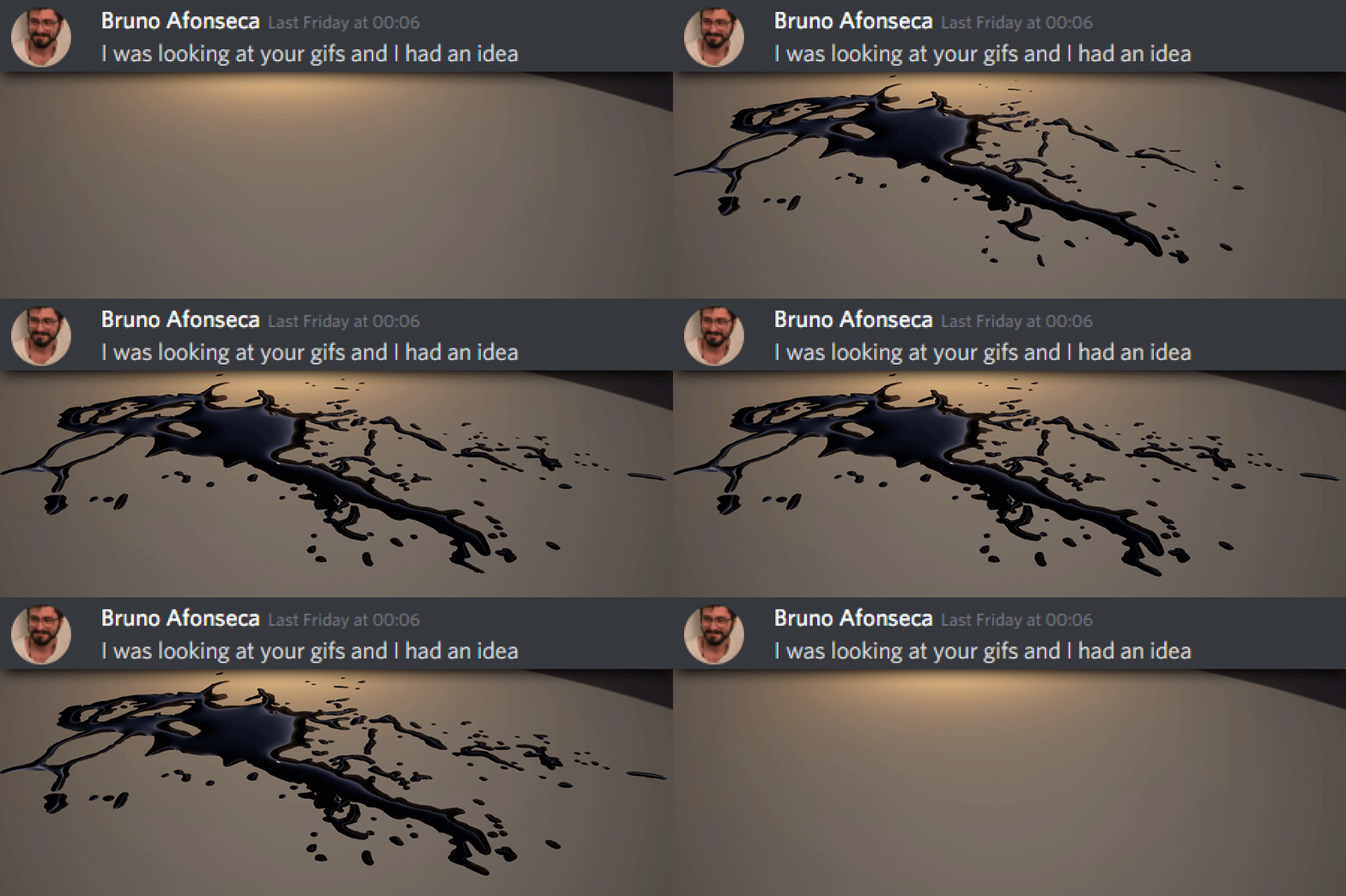
Update: Bruno had a great idea! Here is the result, you can find a detailed description below.
Update: Bruno had a great idea! Here is the result, you can find a detailed description below.


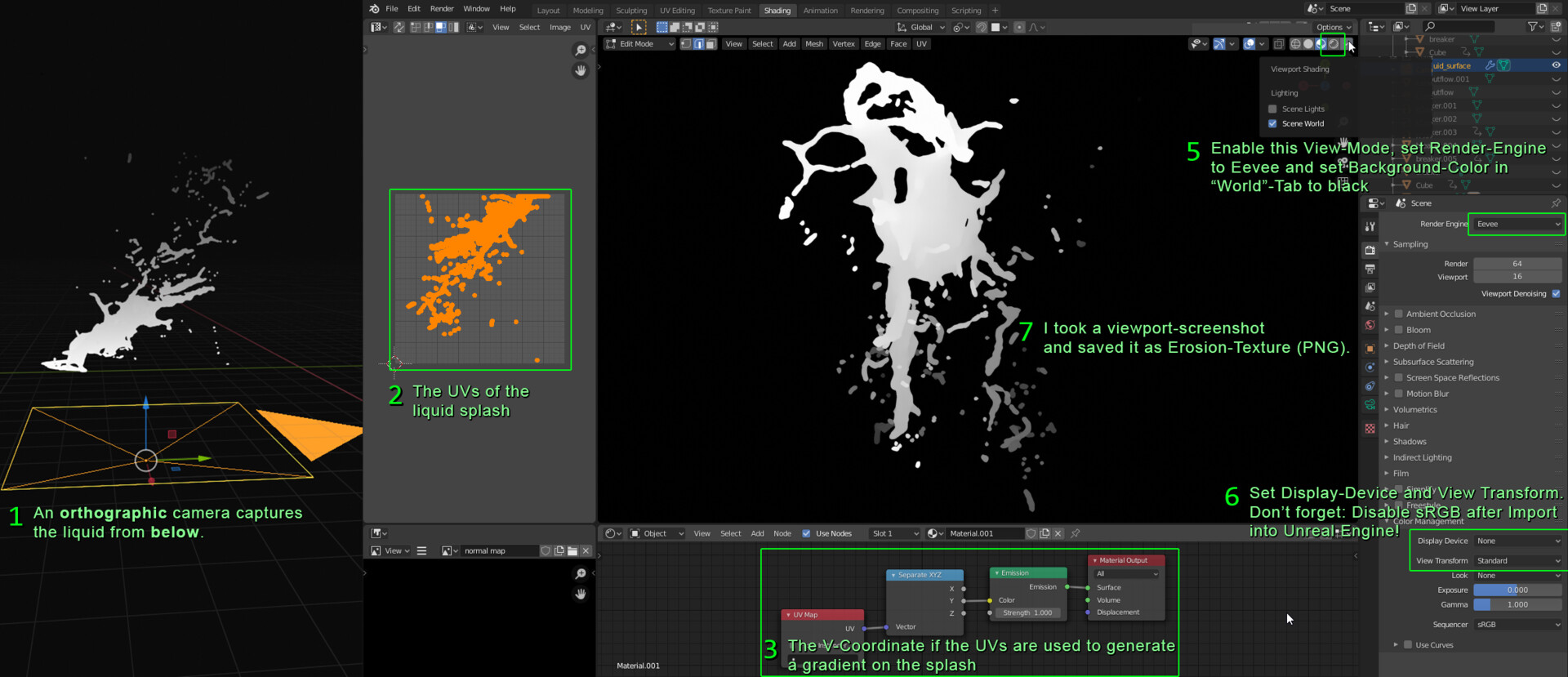
Brunos cool idea: Instead of the complex canvas/python-experiement, you can use a camera capturing the zDepth liquid-geometry from below. I used a B/W-Gradient to simulate the depth in my test and it worked out really nice.


Brunos cool idea: Instead of the complex canvas/python-experiement, you can use a camera capturing the zDepth liquid-geometry from below. I used a B/W-Gradient to simulate the depth in my test and it worked out really nice.


Comments


번호 포토 분류 제목 글쓴이 날짜 조회
1349 언리얼4 Shadow Clones in Unreal Engine 5 Niagara ashif 06.03 33
1348 언리얼4 Shadow Binding Curse in Unreal Engine 5 Niagara ashif 06.02 36
1347 언리얼4 언리얼 - 사실적인 데칼 균열 제작과정(한글자막) 금별 06.01 58
1346 언리얼4 언리얼 - 물결 형태 텍스쳐 트랜지션 효과 제작과정(한글자막) 금별 06.01 54
1345 언리얼4 언리얼/섭디 - 노멀맵 활용 입체 Fake 3d 석재 제작과정 금별 06.01 43
1344 언리얼4 Rock Shield FX in Unreal Engine 5 Niagara ashif 05.27 95
1343 언리얼4 Rift Portal Stylized in Unreal Engine 5 Niagara ashif 05.25 76
1342 언리얼4 언리얼 - Niagara에서 정적 메시를 사용하여 사용자 지정 파티클 모양 만들기 금별 05.17 178
1341 언리얼4 언리얼 - 포스트 프로세스 2D 페이지 넘김 효과 머트리얼 예제 금별 05.17 143
1340 언리얼4 언리얼 - AI 활용 블랙홀 셰이더를 업그레이드(한글자더빙) 금별 05.17 139
1339 유니티 유니티 - 호박(Amber) 셰이더 제작과정(한글자막) 금별 05.12 174
1338 언리얼4 언리얼 - HLSL 심층 설명 4_레이마칭 활용 평면정사각형 메시 3D 구체로 변형 금별 05.12 172
1337 언리얼4 언리얼 - HLSL 심층 설명 4 -UV 좌표를 레이어로 반복 쌓아 깊이감 있는 오목볼록 효과 구현(한글자막) 금별 05.06 256
1336 언리얼4 언리얼 - HLSL 심층 설명 3 -큰 원의 궤적을 따라 작은 원 배치효과(한글자막) 금별 05.06 219
1335 언리얼4 언리얼 - HLSL 심층 설명 2 -원형(Circle) 기반 쉐이더를 구현(한글자막) 금별 05.06 220
1334 언리얼4 언리얼 - HLSL 심층 설명 1 - 그라데이션 변화 도구 구현(한글자막) 금별 05.06 246
1333 언리얼4 언리얼 - 03 나이아가라 트레일 매직 매트릭스_1단계 - 스트립 방출 금별 05.04 252
1332 언리얼4 언리얼 - 02 나이아가라 트레일 매직 매트릭스_2단계 -스트립 트리거 매트릭스 금별 05.04 190
1331 언리얼4 언리얼 - 02 나이아가라 트레일 매직 매트릭스_1단계 - 스트립 방출 금별 05.04 224
1330 언리얼4 언리얼 - 01 나이아가라 트레일 매직 매트릭스_2단계 - 스트립 트리거 매트릭스 금별 05.04 205
1329 언리얼4 언리얼 - 01 나이아가라 트레일 매직 매트릭스_1단계 - 스트립 방출 금별 05.04 188
1328 언리얼4 언리얼 - 00 나이아가라 트레일 매직 매트릭스 효과: 초보자를 위한 속성 금별 05.04 276


Banner
 
Facebook Twitter GooglePlus KakaoStory NaverBand